
Manage Projects & People,
Not Software.
Agilic is a next-generation workforce management application that replaces your outdated project management tools. Manage your people across all of your projects in one place, and be running real work on day one.
Free during beta · Unlimited users · Direct line to the product team
Built for the team that has outgrown the whiteboard.
If a simple task list is no longer enough for you, Agilic is simple enough to get you started on Day One. As you grow and get more complex, Agilic can handle your needs for however you want to work: people working across several projects, a one or two person team juggling ten jobs, or projects that depend on each other.
Agilic is designed for individuals and small and medium-size teams. It is powerful, but it is also built for the person who has reached the point where whiteboards, checklists and Excel stop working.
Service contractors and installers
Bids, site visits, installs and service work in one place.
Operations teams
Ongoing work with no end date, and the surprises that come with it.
IT organizations and IT teams
Including IT teams inside larger organizations.
Marketing agencies
Many clients, many campaigns, one team.
Construction and remodeling
From the first bid and site visit to the final walkthrough. Track pre-contract work, keep every job moving, and log the surprises that come up on site as they happen.
Growing small teams
Past checklists, not ready for enterprise software.
Spend your time managing projects, not the software.
Most project tools ask you to fill out forms, configure fields and learn a methodology before anything gets done. Agilic is built so someone who is not an experienced project manager can be managing projects in less than one day. Our company benchmark: the average user needs less than 15 minutes of training to become productive.
Your whole team, every project
People rarely work on one project at a time. Assign and see your people across all of your projects, instead of one project at a time in separate tools.
Guidance built in
Run the AI Summary every week and get an executive summary of each work package. AI Recommendations point out what changed and who deserves kudos.
Fits how you already work
Kanban boards and three kinds of labels enable any workflow you need; any industry, any methodology or no methodology at all.
Everything a small team or multiple teams need, in one tool.
Views for Individuals
Your own personal view, plus a Private work package for personal growth, training, one-off activities the boss said to go do, or anything else you need it for.
Your whole team, every project
People rarely work on one project at a time. Assign and see your people across all of your projects, instead of one project at a time in separate tools.
Guidance built in
Run the AI Summary every week and get an executive summary of each work package. AI Recommendations point out what changed and who deserves kudos.
Fits how you already work
Kanban boards and three kinds of labels enable any workflow you need; any industry, any methodology or no methodology at all.
Everything a small team or multiple teams need, in one tool.
Views for Managers
The work package, your team views, the whole organization, and Client Views for a specific effort.
Kanban boards plus labels
Kanban at every level, driven by item states and three label types (simple, unbound and bound). Set up the process flow you need and it shows up everywhere.
RIDE: Risks, Issues, Dependencies, Escalations
Something new came up that nobody planned for? Add a RIDE item instead of sending an email. Manage it like any other work, with decisions captured. Escalate it to your Stakeholders so it does not fall through the cracks.
Stakeholder Report
Escalated RIDEs and milestones show up for everyone who needs them. Everyone is on the same page without another meeting.
State vs Status
State is where an item is in its workflow. Status is the team's own signal of how it is going. Keeping them separate shows real risk, not just activity, and both appear on your Kanban boards.
Timesheets, allocations, placeholders
Pre-plan a whole project with placeholders for skills you have not hired yet, then compare planned hours with logged hours. Timesheets are optional.
Client Portal
Invite clients into a portal you control, with a client-specific status, the milestones and RIDE items you choose, and shared documents.
CRM for pre-sales
Client management plus a light CRM with a lead item type. Work on contracts you have not won yet gets captured like any other work.
Made for how people really work.
| The usual project tool | Agilic | |
|---|---|---|
| People and projects | One project at a time. Moving people across projects means more tools or more spreadsheets. | Manage multiple people across multiple projects from one place. |
| Work nobody planned | No place for it, so it lives in email and memory. | RIDE items capture unplanned work and decisions, and everyone can see them. |
| Reporting | One report for everybody, built by hand. | A Stakeholder Report for your boss and a separate client view for your clients. |
| State and status | One field mixes where an item is with how it is going, so risk hides behind activity. | State shows where an item is in its workflow. Status is the team's health signal. Both show on your Kanban boards. |
| Pre-planning | You need names before you can plan. | Placeholders let you plan by skill and add people as you hire or assign them. |
| Notes and documents | OneNote, Excel and shared drives scattered around. | A wiki in every project, and document items with a built-in spreadsheet. |
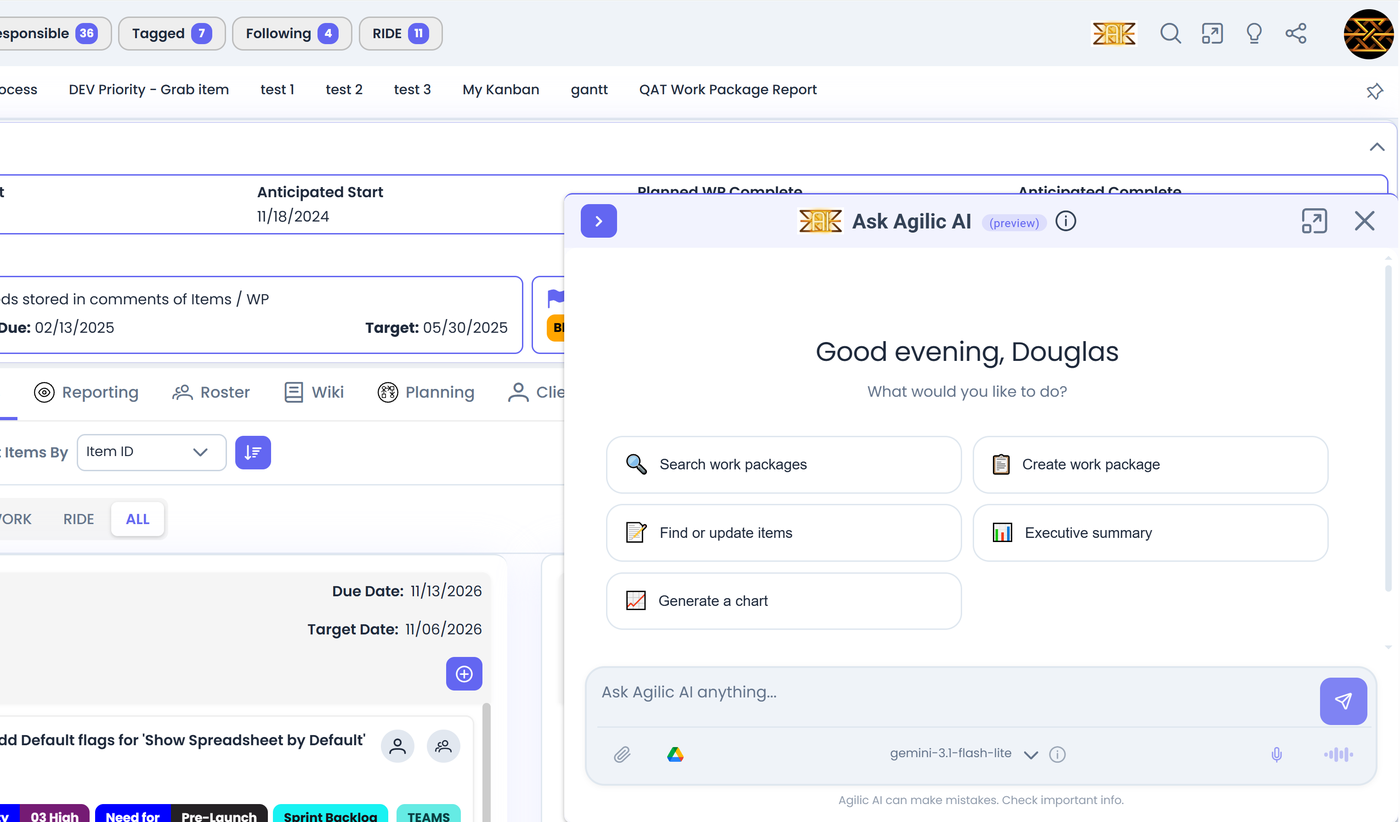
AI that helps you manage, not another thing to manage.
You do not need to know how to write prompts. Press a button for a summary of where a project stands. Ask the assistant to draft a work breakdown or update items, and it checks with you before it changes anything. Already have a favorite AI tool? Connect it to Agilic and let it do the data entry.
- Press a button. Generate a stored AI Summary of any work package and run it every week. AI Recommendations also points out who deserves a kudos.
- Ask the assistant. Find items, read attached documents, build a work breakdown, make a chart, or update work in plain language.
- Bring your own AI. Our MCP server connects the AI tool you already use to Agilic. We have loaded ten projects just by talking to our AI.
Agilic AI only sees your organization's information, only what you have permission to see, and it asks before it changes your data.
Explore Agilic AIFree during beta.
Join the beta and get unlimited users and a direct line to the product team. Beta participants can lock in a future Founders rate.
Pricing after the beta has not been announced yet.
Where Agilic is going
Agilic Matrix for larger organizations is planned for 2027, with a Scrum module planned for Q1 2027 and AI for Teams already in progress. Everything above is available today. The roadmap is clearly separated from it.